Jamie's PS1 collection, and how to customize your bash prompt
Restored in 2026 from the Wayback Machine. This post still gets linked from Ask Ubuntu and friends, so here it is again, unedited.
Tired of your dull bash prompt?
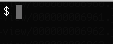
Various bash prompts follow, for my reference and hopefully your inspiration. At the end I’ve compiled detailed docs on crafting your own sweet prompts.
Introducing PS1
What’s your current prompt?
echo $PS1
Try changing it:
export PS1='lolcatz$ '
Add that to your .profile or .bashrc for long-lasting fun
The Collection
The Classic (blue):

export PS1="[\u@\[\e[34;1m\]\H \[\e[0m\]\w]\$ "
The Classic (green):
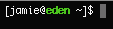
export PS1="[\u@\[\e[32;1m\]\H \[\e[0m\]\w]\$ "
The Classic (magenta):

export PS1="[\u@\[\e[35;1m\]\H \[\e[0m\]\w]\$ "
My old BeOS prompt:

export PS1="\[\e[34;40m\]B\[\e[31;40m\]e \[\e[0m\]\[\e[37;40m\]\w\[\e[0m\]]\$ "Minimalist:

export PS1="\h:\w]\$ "
Solaris Remix (bold white):
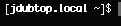
export PS1="[\[\e[28;1m\]\H \[\e[0m\]\w]\$ "
Ubuntu Remix (green/pink):
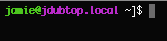
export PS1="\e[32;1m\]\u@\[\e[35;1m\]\H \[\e[0m\]\w]\$ "
D-lux
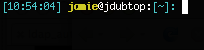
export PS1="\[\033[36m\][\t] \[\033[1;33m\]\u\[\033[0m\]@\h:\[\033[36m\][\w]:\[\033[0m\] "
Prompt in the titlebar (works with rxvt & Terminal.app)

export PS1="\[\e]2;\u@\H \w\a\e[32;1m\]>\[\e[0m\] "
Approval prompt (via Slashdot comment) (colored smileys depending on your success)
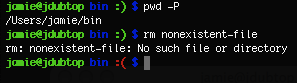
export PS1="\[\e[01;32m\]\u@\h \[\e[01;34m\]\W \`if [ \$? = 0 ]; then echo -e '\e[01;32m:)'; else echo -e '\e[01;31m:('; fi\` \[\e[01;34m\]$\[\e[00m\] "
Send me your pimp prompt and I’ll tack it on what what.
The Manual
Color escape code general syntax:
\e[XX;YYm]
XX = foreground color
YY = background color, but really text styling
Foreground colors
30 = black
31 = red
32 = green
33 = yellow
34 = blue
35 = magenta
36 = teal
Background colors are 40, 41, 42, etc.
Text styles:
0 = reset
1 = bold
4 = underline
5 = blink (!)
7 = invert background & foreground
Reset to plain (always put at the end!):
\[\e[0m\]
Available variables:
\u = your username
\H = full hostname, e.g. bob.example.com
\h = reduced hostname, e.g. bob
\w = full working directory, e.g. /home/jamie/bin
\W = basename of the working directory, e.g. bin
\t = time in 24-hour format
\# = command number
\$ = root identifier; $ for regular users, # for root
\T = time in 12-hour format
\l = terminal device, e.g. tty4
\j = number of background/suspended processes
References
- Daniel Robbins of Gentoo: Tip: prompt magic
- TLDP’s thorough Bash prompt HOWTO
- Custom bash prompts webapp — userfriendly site to generate the above codes